Thank you for reviewing for PLOMSE. Peer review keeps our journals and proceedings reliable, and we recognise every completed review with a certificate.
The invitation
You receive an email from the editor with the title and abstract of the manuscript, the review due date and a link. The link contains a personal access code, so you can open the review directly, even without logging in. Please do not forward it.
If you already have a PLOMSE account you can also log in and open Dashboard → Review Requests (or go to /<journal code>/review/requests/).
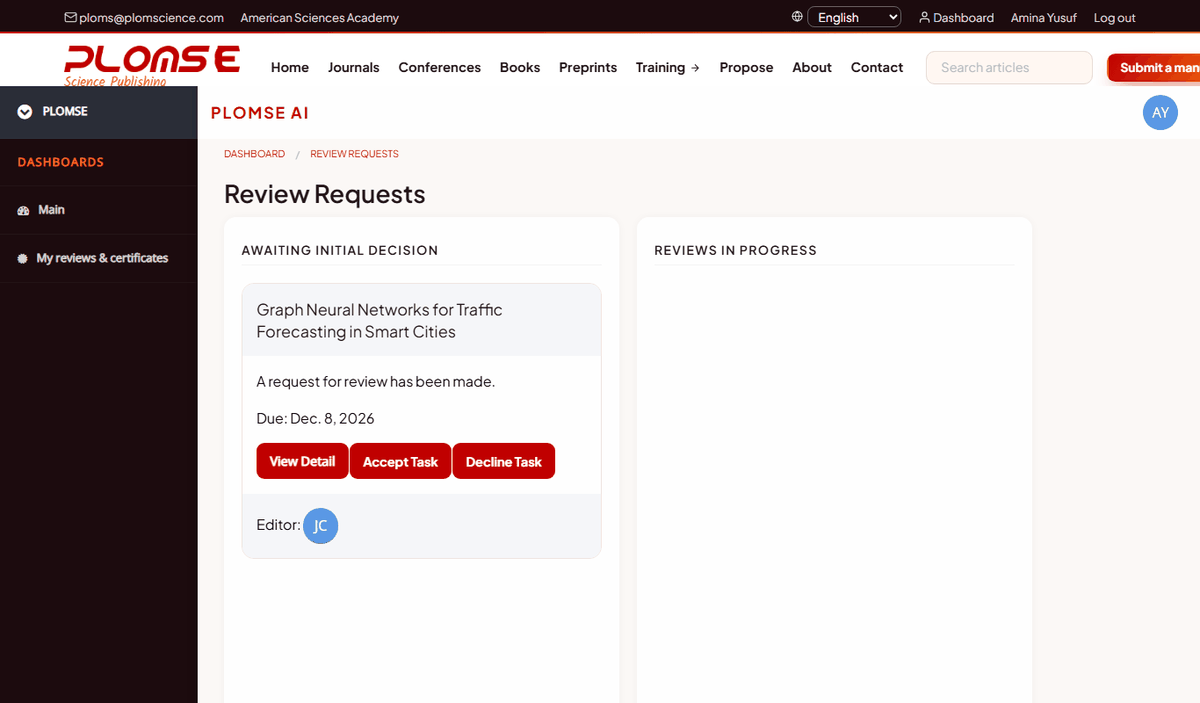
Accept or decline
Open the request. Under Accept or Decline this Review:
- click Agree to perform review if you can complete the review by the due date and have no conflict of interest;
- click Decline to perform review otherwise – you can suggest an alternative reviewer in the message. Please answer quickly either way so that the editor can plan.
Conflicts of interest
Decline (or tell the editor) if you collaborate with the authors, work at the same institution, compete directly with the work or have any other conflict. In double-anonymous review, if you recognise the authors, tell the editor.
Read the guidelines and download the files
The review page shows the General Review Guidelines of the journal, information about the review form, and the manuscript metadata. In Review Files, click the download icon next to each file (manuscript, figures, supplementary material) or Download all as ZIP.
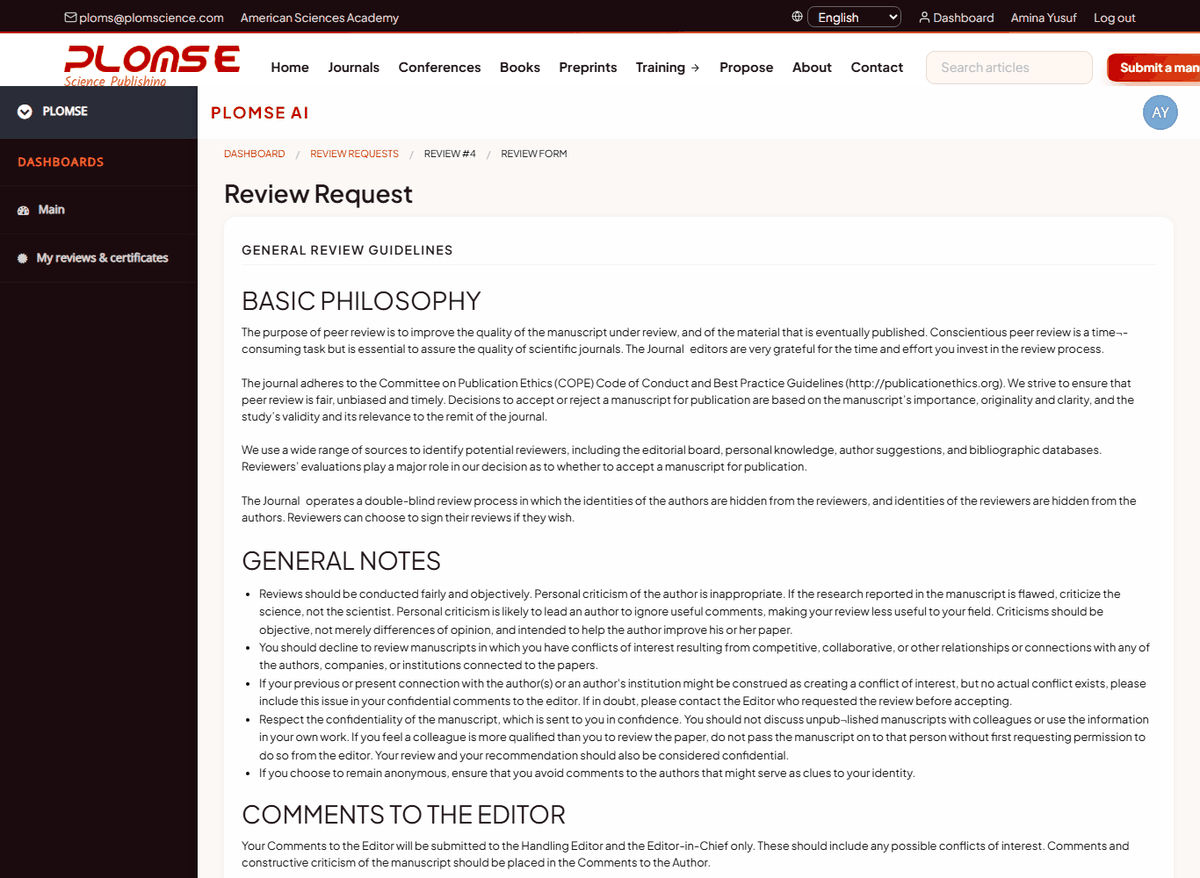
Complete the review form
- Answer the questions of the Review Form (the questions vary by journal: originality, methods, clarity, significance…). Comments to the authors should be constructive and specific.
- Optionally upload a file under File Upload – for example an annotated PDF or a Word document with your comments. In anonymous review, make sure the file does not reveal your identity (remove your name from the document properties and comments).
- In Your Recommendation choose one: Accept Without Revisions, Minor Revisions Required, Major Revisions Required or Reject. Add Comments for the Editor that the authors will not see.
- Click Save progress and continue later to keep a draft, or Complete Review when you are finished.
If the journal offers it, Download Review File (Docx) gives you the form as a Word file to prepare your answers offline; you still submit them in the online form.
Deadlines and reminders
The due date is in the invitation and on the review page. The editor may send you a reminder as the due date approaches. If you need more time, contact the editor (reply to the invitation email) – an extension is usually possible if you ask early.
After you submit
- The editor is notified and reads all reviews before making a decision. Reviews may be shared with the authors (without your name in anonymous review) and, if the journal allows, with the other reviewers.
- You may be invited to review the revised version in a new round.
- You receive a thank-you email with your review certificate.
Your reviews and certificates
Logged-in reviewers can open My reviews & certificates (/plugins/plomse_editorial/reviews/). It shows your completed reviews, the journals you reviewed for and your average turnaround, by journal and by year. For each review:
- View / print opens the certificate (with a verification code such as
PLOMSE-RC-XXXX-XXXX-XXXXthat anyone can check online); - Export CSV gives you the list for entering your reviews in ORCID or Web of Science.
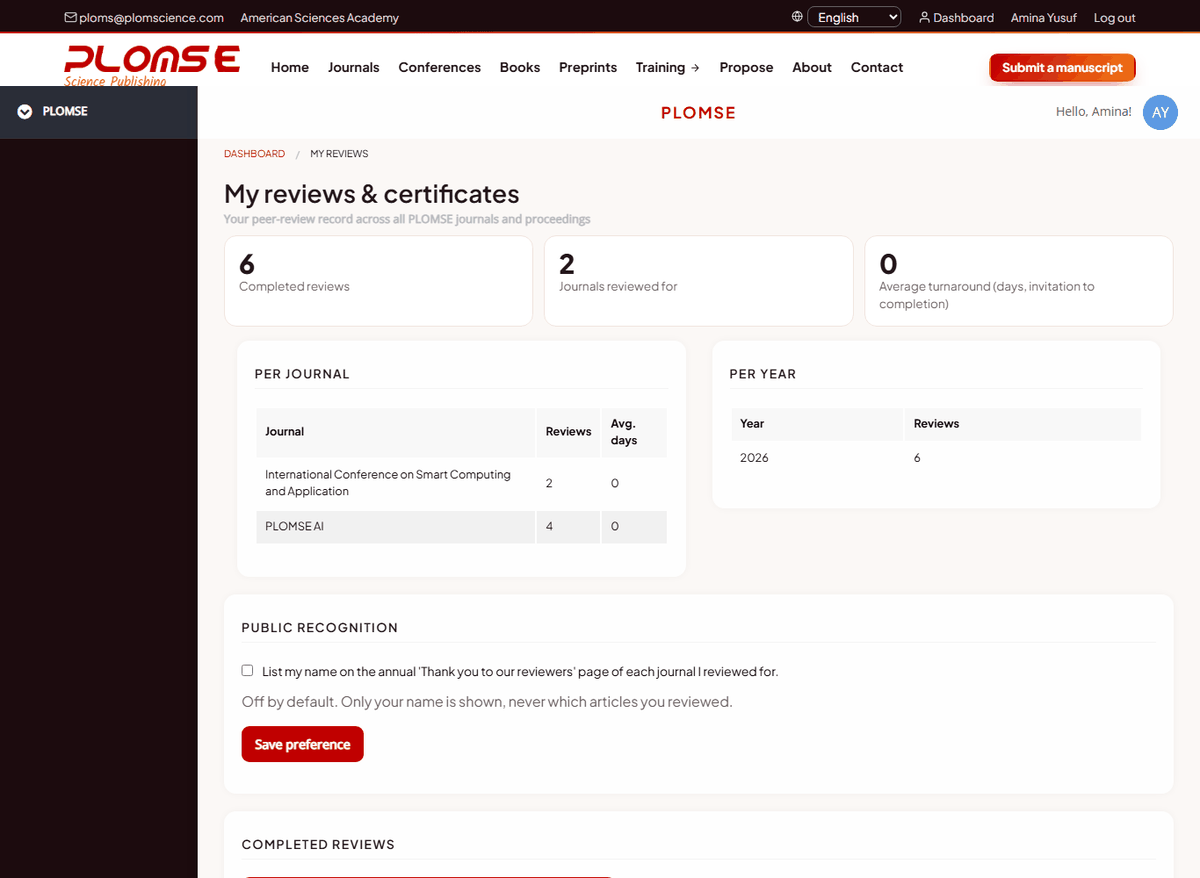
Public recognition: tick List my name on the annual "Thank you to our reviewers" page and click Save preference if you want to be thanked publicly. It is off by default; your name is never linked to a specific manuscript.
Becoming a reviewer
To volunteer as a reviewer for a journal, register, add your research interests and ORCID iD to your profile, and write to the journal's editorial office (Contact page) with your areas of expertise.